AI-enabled DSM
A tokenized design system powering consistent experiences and AI-enabled workflows across Medline’s digital ecosystem.
- Role
- Design Direction
- Project Management
- Key Milestone
- Base DSM
- Multi-brand
- Migration
- Key Tasks
- Design Audit
- UX Design
- Migration
- Tools
- Figma
- Storybook
- Claude
01
Problem
Medline’s existing design system faced four limitations that made it difficult to maintain consistency, evolve the experience, and support new ways of working.
Outdated technology and fragmented components
The front-end stack relied on multiple versions of UI components, including legacy components that no longer supported updates. This complicated maintenance and limited modernization.
Disconnected design assets and standards
Design files, components, and documentation were distributed across teams and tools. Without a reliable shared source, teams worked from inconsistent assets and recreated solutions independently.
Limited support for the broader ecosystem
The system did not adequately serve Medline’s full digital portfolio, spanning B2B commerce, B2C commerce, and multiple brand sites. It lacked a shared foundation that could maintain consistency while accommodating different product and brand needs.
Insufficient foundations for AI-assisted workflows
The system lacked the tokenized structure and explicit design rules needed to guide AI-assisted implementation. Design decisions were difficult to reuse consistently across design and development.
02
Our approach
I initiated the modernization effort, working with my team to define a shared foundation for Medline’s digital ecosystem. We organized our approach around three priorities.
01
One design system for Medline’s digital ecosystem
Establish a shared foundation for B2B commerce, B2C commerce, and brand experiences. Align products around common components and standards while supporting their distinct needs.
02
A scalable architecture built on design tokens
Translate design decisions into reusable tokens that connect brand foundations, product themes, and components. Make updates easier to maintain and extend across products without rebuilding the system for each experience.
03
A foundation for AI-assisted workflows
Give AI-assisted tools structured design rules, tokens, and coded components to reference. Connect the design system to implementation so teams can build and refine interfaces using the same shared foundation.
03
Solution
We rebuilt the system around a central principle: separate shared design decisions from the appearance of individual products. This allowed us to connect ecosystem-wide consistency, scalable architecture, and AI-assisted implementation.
01
One system, every property
A shared foundation designed to support Medline’s B2B and B2C commerce, marketing CMS, and brand sites. Reusable components and tokens keep experiences connected, while modes accommodate differences in brand, platform, and screen size.
- B2C ecommerce
- B2B ecommerce
- Marketing CMS
- Brand sites
Smart components
Inherit token values across screen contexts.
Each layer references the one belowMapped tokens: where it is used
Interface roles and platform styling; responsive values use a dedicated collection.
Platform mode
LiveB2C · B2B
Platform styling and visibility.
Screen mode
In progressResponsive collection
Layout, spacing, visibility, type size.
Shared aliases: what it means
Action · Error · Radius
Brand primitives: what exists
Color palettes, typography, and base values
Brand mode
PlannedTarget: Medline · atHome · SuiteStyles
Sets palette and type.
Implementation status details
- Platform mode: Marketing platform mode is planned.
- Screen mode: Current modes mix screen and product context; tablet and mobile type are not yet defined.
- Brand mode: Multi-brand theming is placeholder work; the current CMS mode differs by one value.
02
A layered architecture that makes change scalable
Brand primitives define the values, shared aliases give them meaning, and mapped tokens apply them to interface roles. Components inherit those decisions, making shared changes easier to maintain across products.
01 / Brand primitives
The available values
02 / Aliases
Meaning and state
03 / Mapped tokens
Where decisions apply
04 / Components
Reusable interfaces
Brand primitive
Alias
Mapped token
Default
Brand primitive
Alias
Mapped token
Hover
Brand primitive
Alias
Mapped token
Active
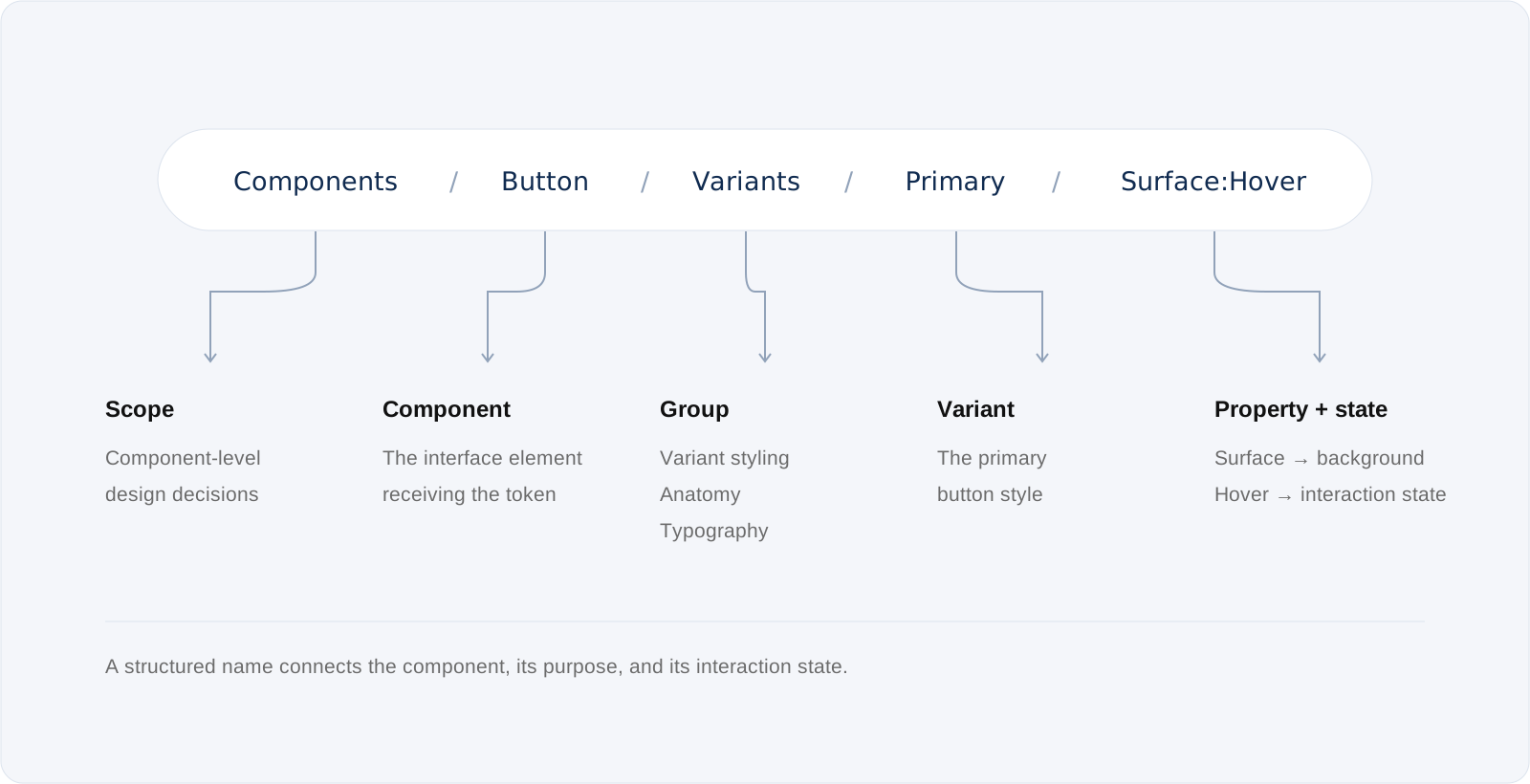
Brand primitives supply values. Aliases define their meaning. Mapped tokens assign them to interface roles. Components bring those decisions together.
In this redesign, we introduced brand variables, mapped and responsive tokens, multiple modes, and smart components that inherit shared design decisions. Together, these foundations help one system adapt across Medline’s products, brands, and screen sizes while keeping updates consistent and easier to scale. Structured token names make those decisions explicit for designers, developers, and AI-assisted workflows.
03
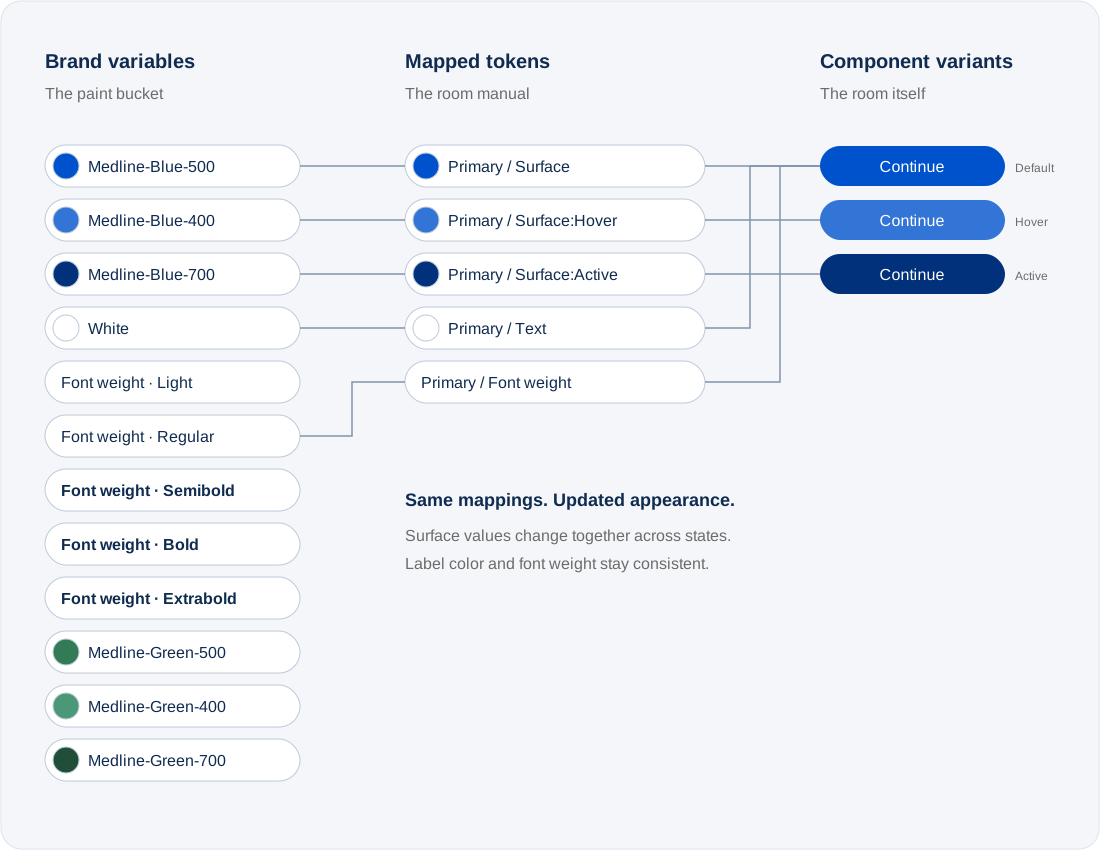
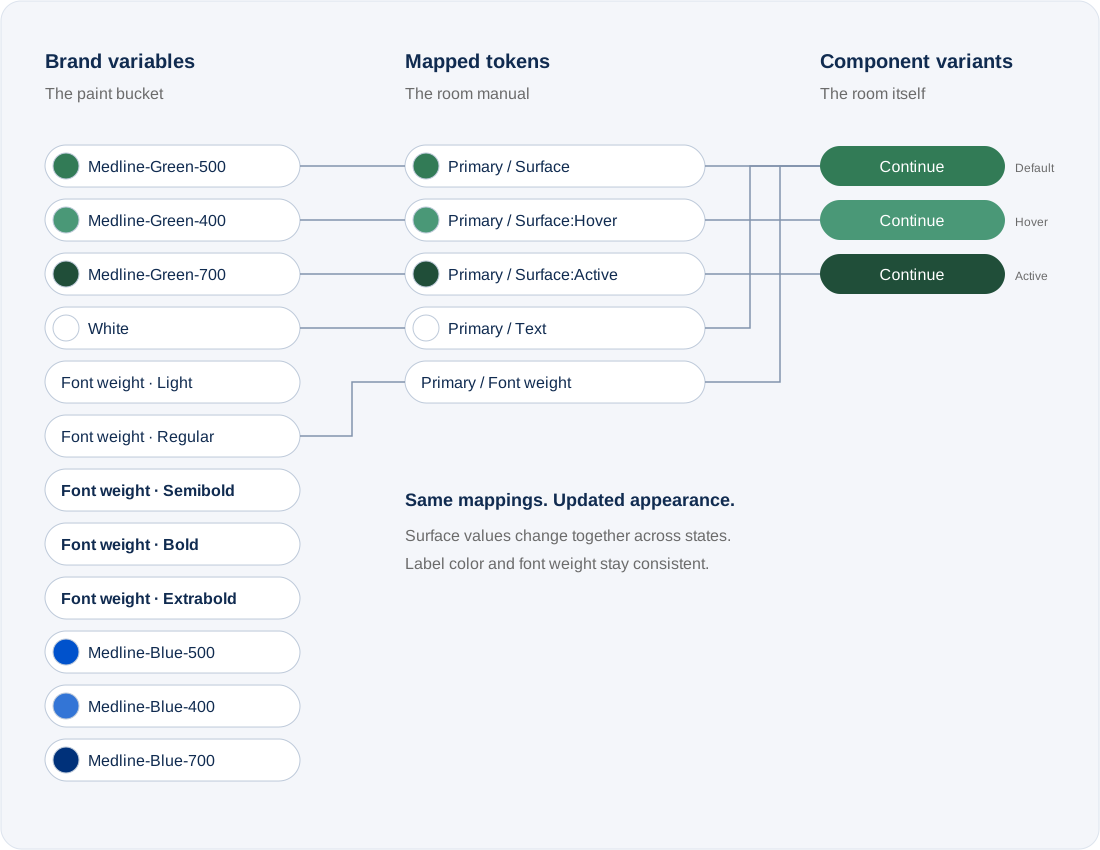
Updating the system is as easy as changing the source
Like changing the paint while keeping the room’s plan, updating shared brand values lets connected components inherit a new appearance. The blue-to-green example shows how default, hover, and active states update together while the component structure, label color, and typography remain consistent—reducing manual edits across products.
04
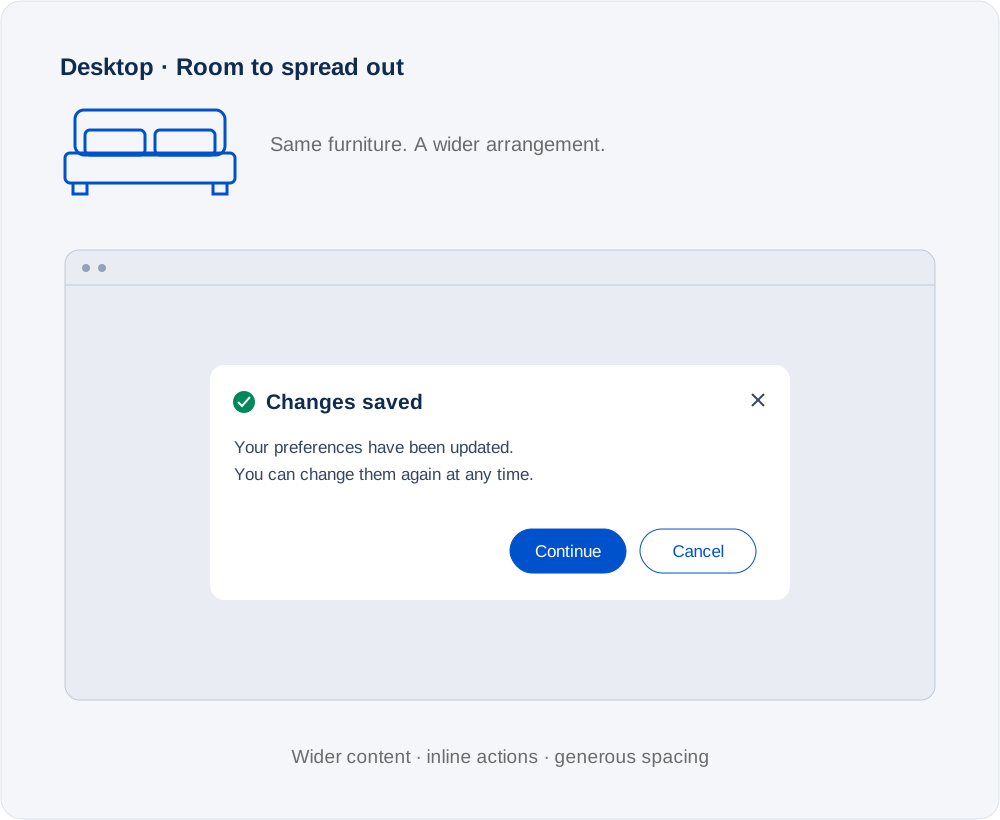
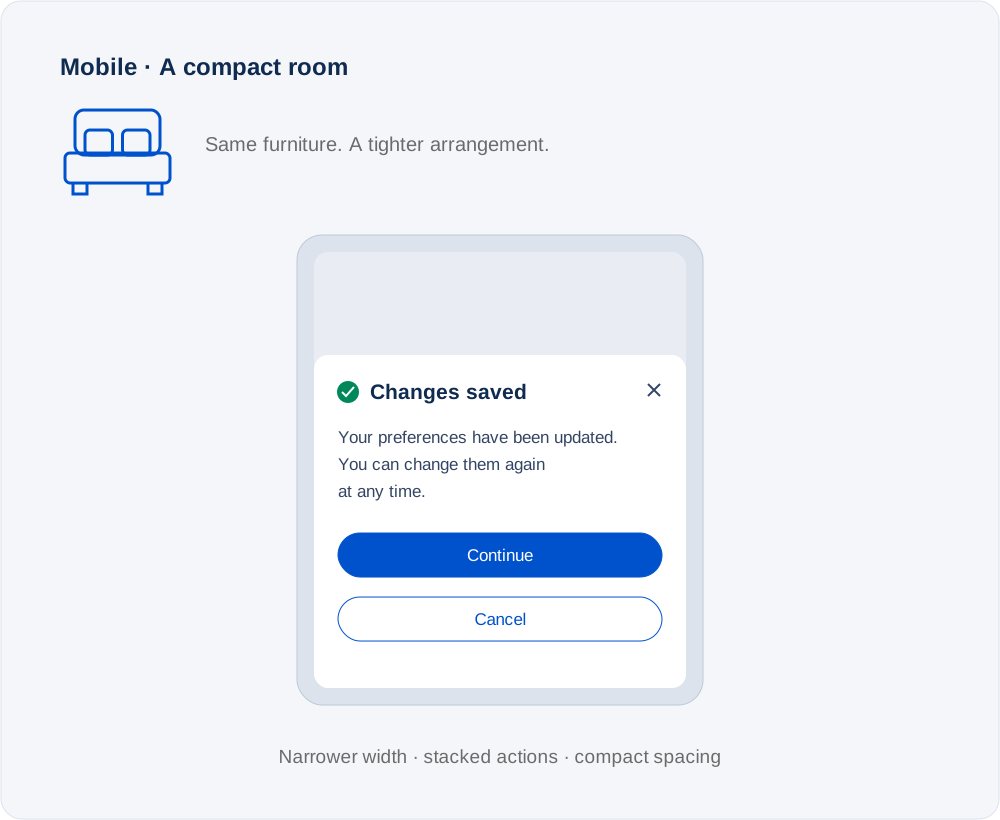
One component, room for every screen
Think of the interface as a room: the furniture serves the same purpose, but its arrangement adapts to the available space. Responsive tokens define spacing, widths, and visibility for each screen context, helping smart components adapt without rebuilding each layout from scratch.
In this modal example, a wider screen gives content and actions room to sit side by side. On a smaller screen, the content narrows and actions stack. Shared tokens and layout rules keep both experiences connected to the same design foundation.
05
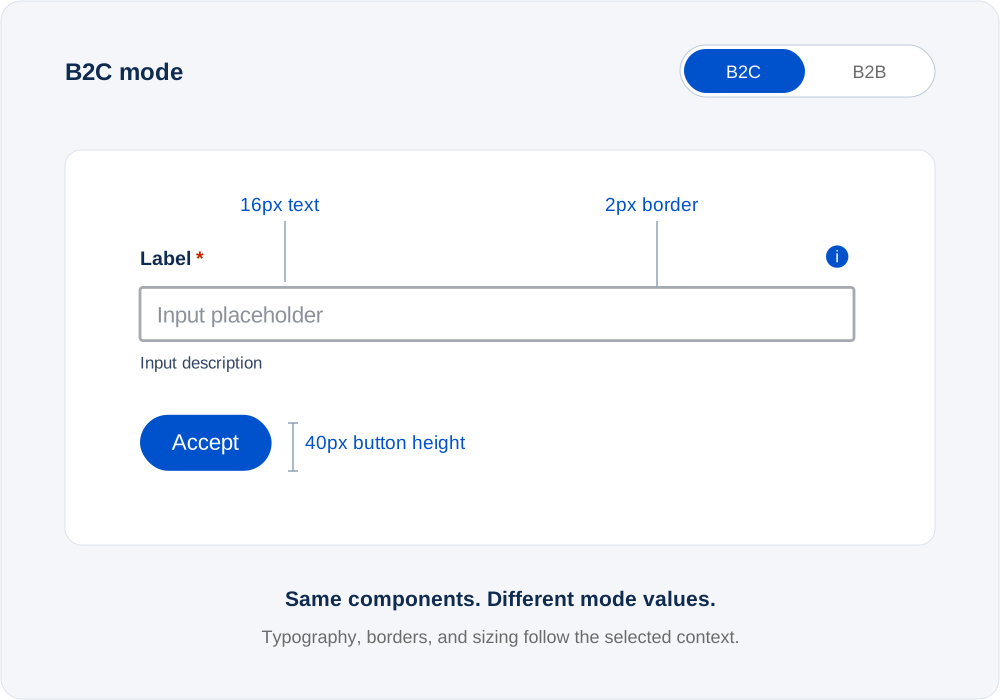
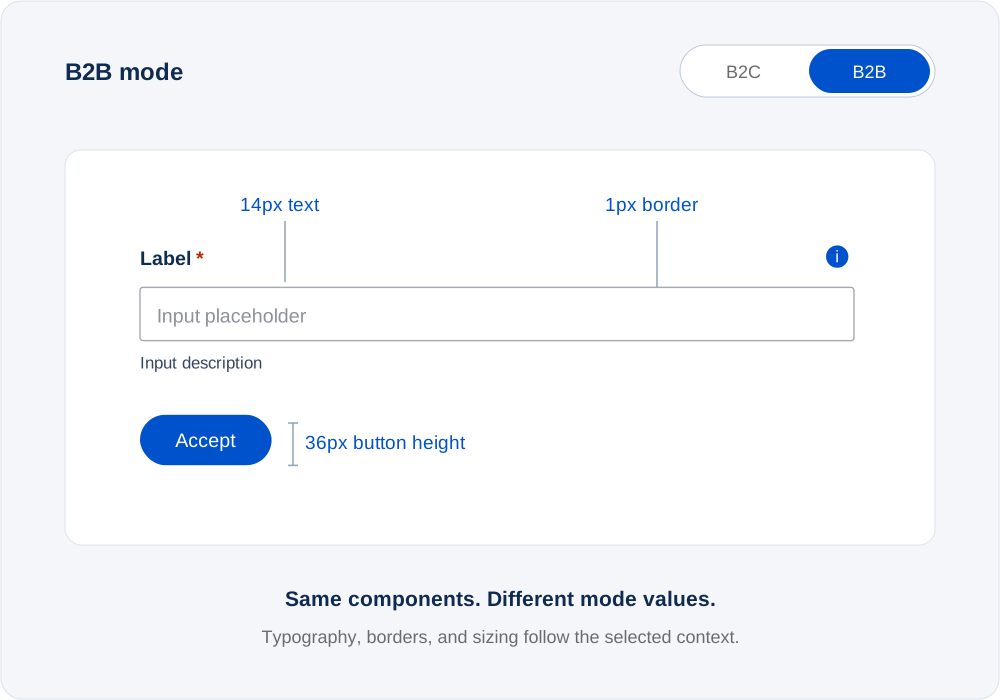
Switch the mode, keep the system
Like switching a room’s lighting scene, modes apply a predefined set of design decisions to a familiar environment. Selecting a product mode changes the token values used by connected components, adapting their styling and visibility while preserving the shared design-system foundation.
B2C and B2B experiences can use the same component library with different settings for their context. Teams can switch modes instead of maintaining separate copies, making product-specific updates easier to manage and helping experiences stay consistent across Medline’s ecosystem.
06
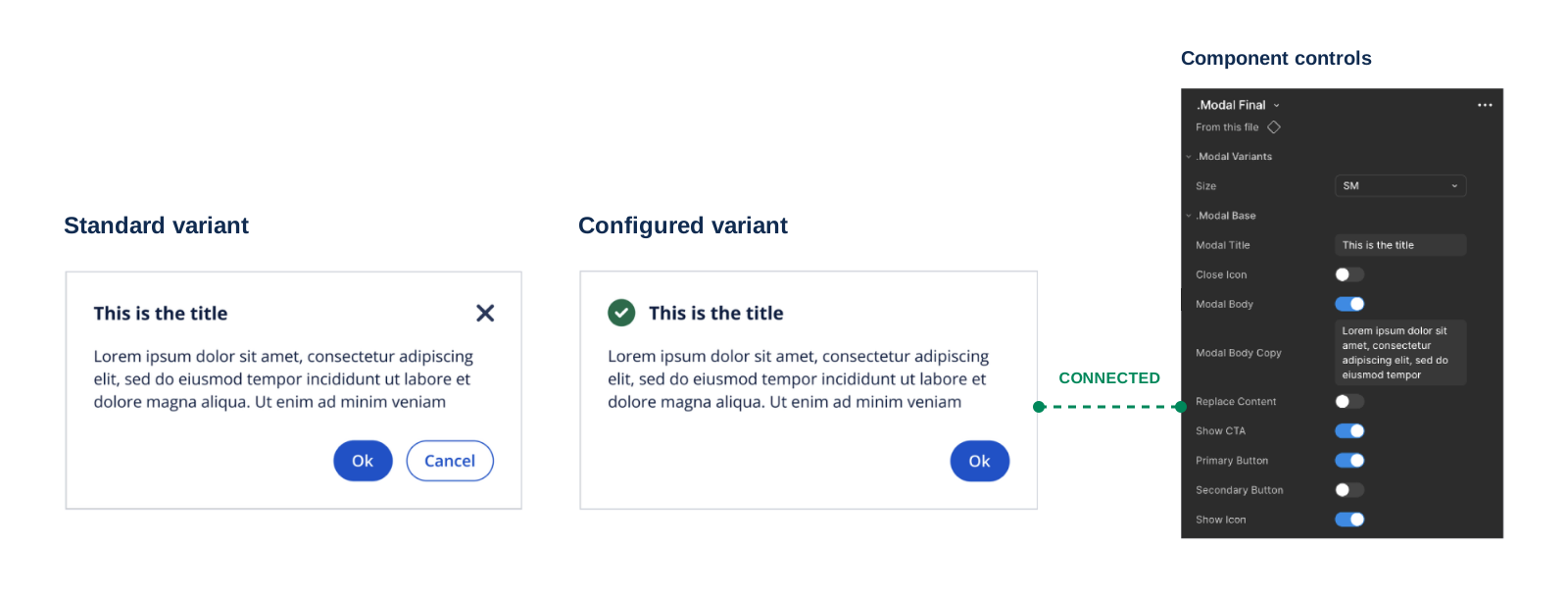
Configure without breaking the connection
A smart room changes through its control panel. Smart components work the same way: designers can adjust content, toggle icons, and configure actions through built-in properties, while keeping the instance connected to the shared library.
The modal’s controls support different needs without detaching or rebuilding the component. This gives teams flexibility within shared rules, preserves token bindings, and allows future library updates to reach connected instances.
07
AI-enabled. Human in the loop. The system improves.
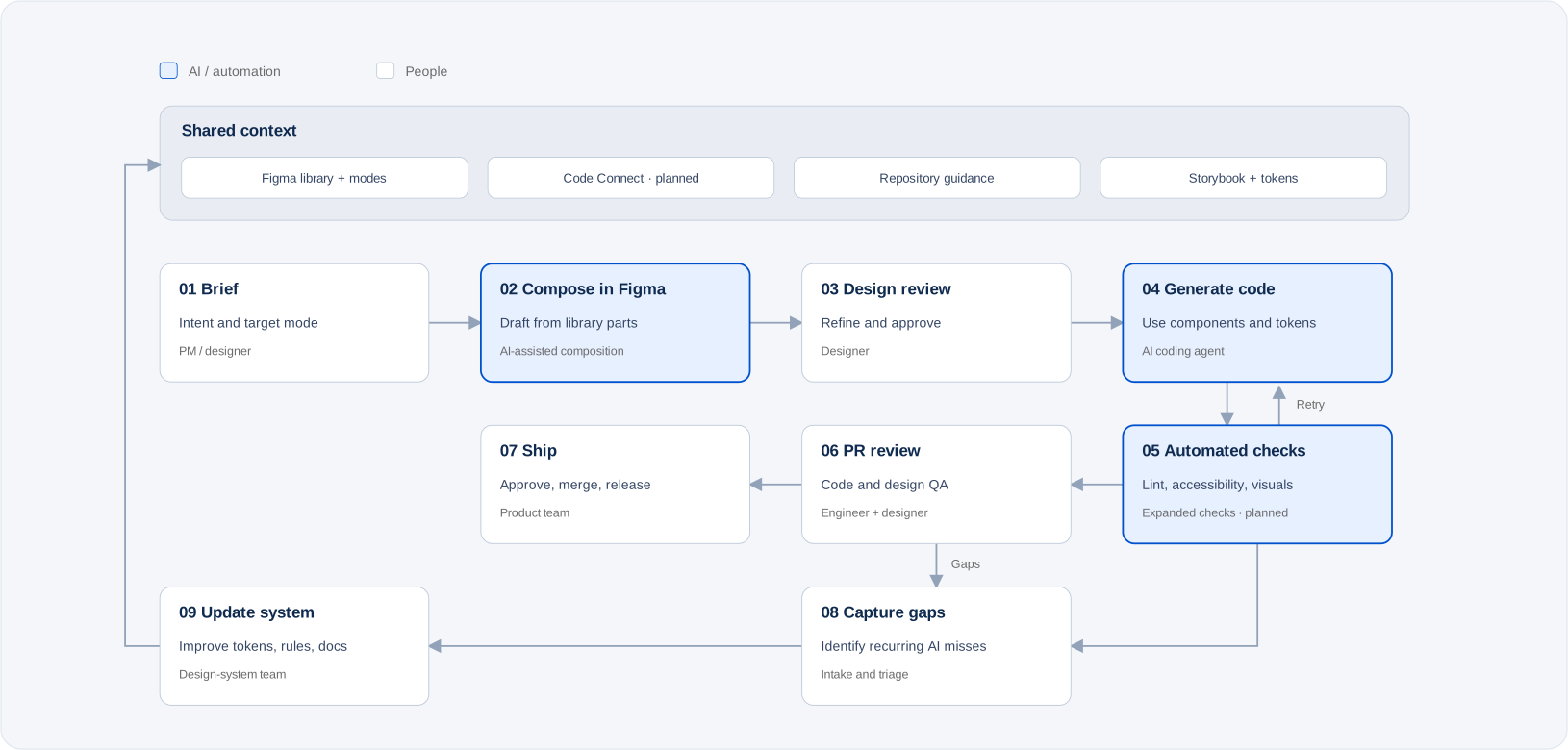
The tokenized design system gives AI a shared foundation for composing interfaces and generating code. Library components, modes, tokens, Storybook, and explicit guidance provide context, while designers and engineers define intent, review the work, and approve what ships.
The end-to-end workflow includes two feedback loops: failed checks return to the agent for revision, and recurring gaps inform improvements to the design system. Each improvement strengthens the shared context for the next design or implementation task.
04
Learnings
One architecture serves both goals
Multi-brand scale and AI readiness share the same foundation: separating design decisions from their appearance. Layered tokens—Brand → Alias → Mapped—and contextual modes allow shared components to adapt across brands, platforms, and screen sizes. That structure also gives AI meaningful roles such as “action surface” to reference, rather than isolated color values. Consistency starts with the system’s setup.
Structure is the interface—for people and AI
Purpose-based names, clear token relationships, and guidance that tools can read make design intent usable beyond the canvas. Skipped token layers, color-based names, competing breakpoint definitions, and canvas-only documentation expose ambiguity that both people and AI must resolve.
The next step is to make those rules more explicit through component descriptions, code syntax, and Code Connect. A well-defined structure gives Figma MCP and coding agents a more reliable basis for implementation, while human review remains essential.
Centralize the structure. Share ownership of expression.
The core team should own component structure, token names, and shared meaning, while brand teams manage their palette values within those rules. This creates room for distinct identities without fragmenting the foundation.
As adoption grows, governance should combine human ownership with automated checks for token completeness, contrast, raw values, and visual consistency across modes. Recurring AI mistakes should become improvements to tokens, components, or guidance—so each use helps strengthen the system.